Three-Click Magnetic Rail Slider
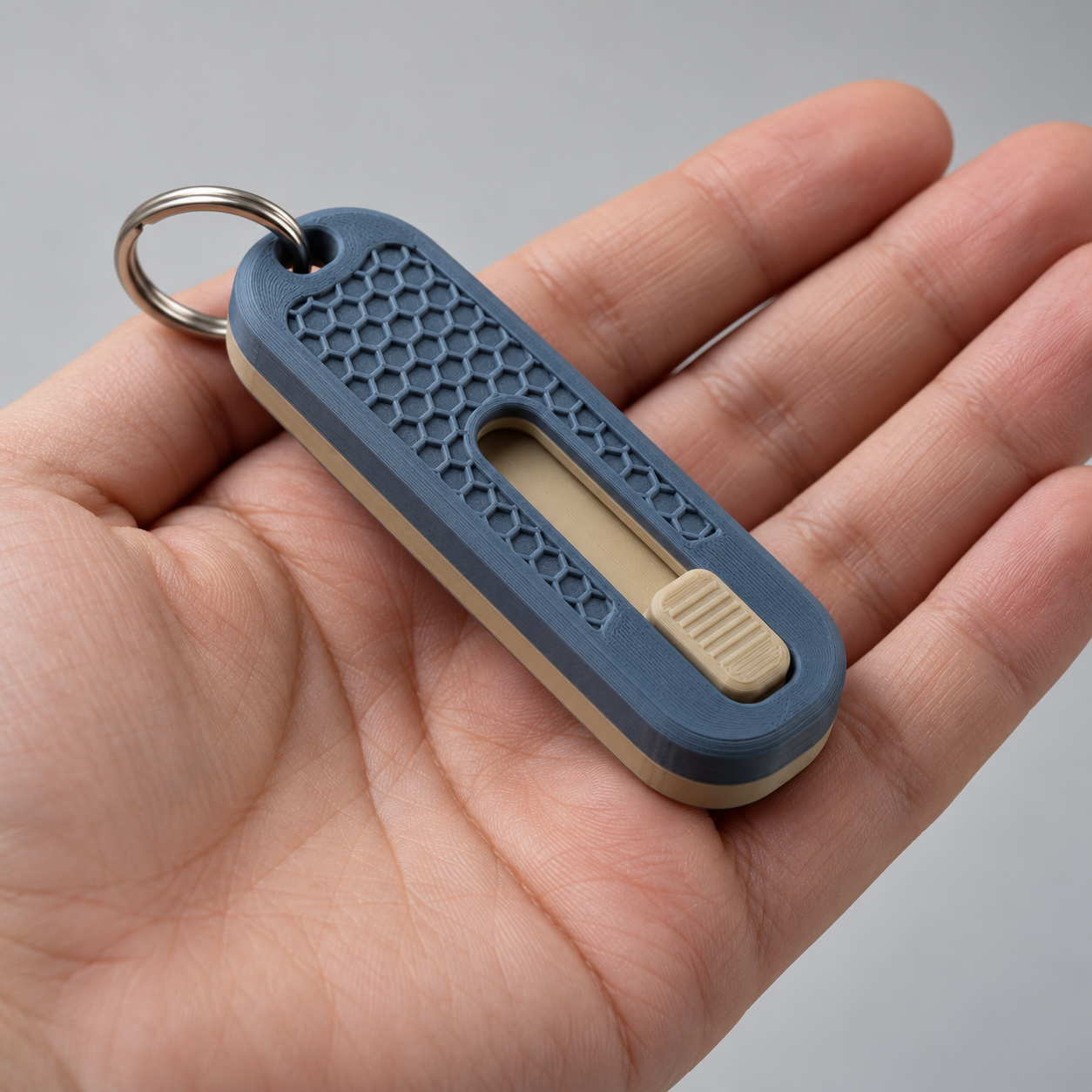
A keychain-sized fidget where a magnetic slider snaps hard to each end of its channel and catches on a mechanical bump in the middle, giving a thumb three distinct clicks instead of the usual two.
Three-Click Magnetic Rail Slider
A keychain-sized fidget where a magnetic slider snaps hard to each end of its channel and catches on a mechanical bump in the middle, giving a thumb three distinct clicks instead of the usual two.
Date: 2026-10-17 Category: Toys and Fidgets Modeling difficulty: Beginner Estimated print: ~2.5 h total · ~25 g PLA (estimate) Suggested price: $10–$16 printed · $4 digital file (estimate) Status: Concept
Description
This is a two-part frame — top and bottom halves that snap together — with a slider trapped in the channel between them. Four small disc magnets, two in the frame's end pockets and two in the slider, pull the slider firmly to each end of its 23 mm travel. A small printed bump in the channel floor and a matching dimple on the slider's underside give a third, lighter click right at the midpoint, so a thumb running the slider end to end feels left-click, center-click, right-click instead of just two magnetic stops.
The top half carries a honeycomb-textured grip patch over the travel zone and a through-hole at one end for a keyring, so it rides on a keychain or sits on a desk equally well. Once assembled it's sealed — the magnets and slider never come back out, which keeps the mechanism simple and the part count at three.
Why it sells
Magnetic haptic sliders are an active, named category on every major print-sharing platform right now. Free and paid versions are posted on MakerWorld [Simple fidget slider, embedded magnets] and [Magnetic Fidget Slider, 6x3mm magnets], on Printables [Magnetic Haptic Slider Fidget], and on Cults3D [Haptic Fidget toy magnet slider], and the mechanism has crossed over into paid Etsy listings as both finished prints and STL files [Magnetic Fidget Slider STL File], [3D Printed Magnetic Haptic Fidget Slider Ring Toy]. A 2026 roundup of top fidget prints lists magnetic sliders alongside flexi dragons and infinity cubes as one of the genre's current leaders [20 Best 3D Printed Fidget Toys in 2026].
Every design we found gives exactly two stops — end to end, nothing in between. Adding a mechanical center detent gives three distinct clicks in one short throw, and the keyring hole most sliders skip turns it from a desk object into something that rides on your keys every day.
Who buys it
Desk-fidget buyers already shopping MakerWorld, Printables, and Etsy for haptic toys, plus the keychain-gift crowd — stocking stuffers, conference swap-meet giveaways, office grab-bag gifts. It's small and cheap enough to be an impulse add-on next to a bigger print order.
Design overview
- Three magnetic click positions in one 23 mm throw: two magnetic end-snaps plus a mechanical center detent
- Slider rides in a fully enclosed channel, so dust and pocket lint can't jam it the way an exposed-rail design can
- Honeycomb grip texture over the travel zone, both tactile and visually distinct from the usual smooth-top sliders
- Keyring through-hole built into the frame, not a separate bolt-on loop
- Three parts, no fasteners, no glue required — the only "hardware" is the four magnets dropped into pockets before the final snap
- Flat, boxy geometry throughout — no curved surfaces or compound angles to fight in CAD
Dimensions
| Measurement | Value (mm) | Notes |
|---|---|---|
| Overall width (X) | 75 | assembled frame length |
| Overall depth (Y) | 28 | assembled frame width |
| Overall height (Z) | 12 | assembled frame thickness |
| Frame-Bottom thickness | 8 | includes 5 mm deep channel + 3 mm floor |
| Frame-Top thickness | 6 | includes 0.6 mm honeycomb emboss |
| Channel (travel zone) | 43 × 14 × 5 | L × W × D, between the two end blocks |
| Slider travel distance | 23 | channel length minus slider length |
| Magnet pocket | 6.2 diameter × 3.2 deep | ×4, two in frame, two in slider |
Parts list
| Part | Qty | Material | Size X×Y×Z (mm) | Print orientation | Supports |
|---|---|---|---|---|---|
| Frame-Bottom | 1 | PLA | 75 × 28 × 8 | Flat, bottom face down | none |
| Frame-Top | 1 | PLA | 75 × 28 × 6 | Flat, honeycomb face up | none |
| Slider | 1 | PLA | 20 × 14 × 5 | Flat, base down | none |
Hardware and non-printed parts
- 6 × 3 mm N52 disc magnet × 4 — two press-fit into Frame-Bottom's end pockets, two into the slider's end pockets
Fits and tolerances
| Mating parts | Fit type | Clearance per side |
|---|---|---|
| Magnets ↔ magnet pockets (all four) | Press | 0.1 mm |
| Slider ↔ channel (Frame-Bottom) | Sliding | 0.2 mm |
| Frame-Top ↔ Frame-Bottom (snap tabs) | Snap | 0.15 mm |
Modeling guide
Origin sits at the bottom-left-front corner of Frame-Bottom. +X runs along the slider's travel, +Y runs across the frame's width, +Z runs up.
Frame-Bottom
- Sketch rectangle 75 × 28, corner radius 4, on the XY plane. Extrude 8 in +Z.
- On the top face, sketch the channel pocket: rectangle 43 × 14, corner radius 2, positioned with its left edge at X = 16, centered in Y. Cut 5 deep.
- In the left end block (X = 0–16), cut a magnet pocket: 6.2 mm diameter circle, 3.2 mm deep, centered at X = 12, Y = 14, cut from the top face down.
- In the right end block (X = 59–75), cut a matching magnet pocket centered at X = 63, Y = 14.
- On the channel floor, add a center detent bump: hemisphere radius 1.2, height 0.8, centered at X = 37.5, Y = 14.
- Cut a keyring through-hole: 5 mm diameter, centered at X = 5, Y = 14, through the full 8 mm height.
- Add four snap-tab sockets for Frame-Top: 2 mm diameter, 1.5 mm deep, at (5, 3), (70, 3), (5, 25), (70, 25).
- Fillet all external edges 1.5 mm.
Frame-Top
- Sketch rectangle 75 × 28, corner radius 4, on the XY plane. Extrude 5 in +Z.
- On the outer (top) face, emboss a honeycomb pattern: hexagonal cells 6 mm point-to-point, 1 mm wall, raised 0.6 mm, covering the area X = 16–59, Y = 4–24.
- On the inner (bottom) face, add four snap tabs matching Frame-Bottom's sockets: 1.8 mm diameter, 1.8 mm tall, at the same four XY positions.
- Cut a keyring through-hole: 5 mm diameter, centered at X = 5, Y = 14, aligned with Frame-Bottom's hole.
- Fillet all external edges 1.5 mm.
Slider
- Sketch rectangle 20 × 14, corner radius 2, on the XY plane. Extrude 5 in +Z.
- Cut two magnet pockets: 6.2 mm diameter, 3.2 mm deep, from the top face, centered at (X = 3, Y = 7) and (X = 17, Y = 7) in slider-local coordinates.
- On the bottom face, cut a shallow center dimple: radius 1.2, depth 0.5, centered at (X = 10, Y = 7), to engage the frame's center bump.
- Fillet all external edges 1 mm.
Print settings
| Setting | Value |
|---|---|
| Material | PLA |
| Nozzle | 0.4 mm |
| Layer height | 0.16 mm |
| Walls / perimeters | 3 |
| Infill | 25% gyroid |
| Supports | none |
| Brim / adhesion | none |
| Notes | Rub a trace of paraffin wax or graphite powder on the slider's sides before final assembly for a smoother glide |
Assembly
- Press one magnet into each of Frame-Bottom's two end pockets, poles facing into the channel (same orientation on both).
- Press one magnet into each of the slider's two end pockets, poles oriented to attract the corresponding frame magnet.
- Drop the slider into Frame-Bottom's channel.
- Align Frame-Top over Frame-Bottom and press down until all four snap tabs click into their sockets.
- Thread a keyring through the aligned hole at the left end.
Variants and upsells
- Swap the honeycomb emboss for a different texture (diamond knurl, linear ribs) as a cosmetic variant
- Offer a two-tone version: Frame-Top and Frame-Bottom printed in different colors via a filament swap
- Scale
channel_lengthup for a longer-throw desk version without the keyring hole - Bundle three in a single order as a party-favor or team-gift pack
Selling and distribution
MakerWorld and Printables fit a free or low-cost STL release aimed at the existing haptic-slider audience already searching those platforms. Etsy suits the finished, assembled print, priced against the comparable listings found in research. Price the printed unit at $10–16 (small part count, ~$1 material cost, strong margin) and the file at $4. License the file CC BY-NC — the mechanism (magnets in a channel) is common to the category, but this specific frame, detent, and keychain integration are original.
Listing keywords: magnetic fidget slider, haptic slider toy, keychain fidget, desk fidget toy, 3D printed fidget, anxiety relief toy, click fidget, sensory toy keychain.
Risks and IP notes
- Magnet pole orientation errors during assembly will push the slider away instead of snapping it — mitigate with a clear poles-up assembly diagram in the listing
- The category is crowded with free STLs on MakerWorld and Printables, which caps achievable price on a paid digital file — mitigate by leading with the assembled print, not the file, as the primary SKU
- Snap-tab frame is sealed and non-serviceable; a failed magnet means discarding the unit — mitigate by testing all four magnets before final assembly
- No branded names or third-party characters appear in the design
Resource links
- Simple fidget slider, embedded magnets — MakerWorld — comparable free design, magnet-in-pocket technique
- Magnetic Fidget Slider, 6x3mm magnets — MakerWorld — comparable design confirming 6x3mm magnet sizing used in this spec
- Magnetic Haptic Slider Fidget — Printables — comparable Printables listing in the same category
- Haptic Fidget toy magnet slider — Cults3D — comparable paid listing
- Magnetic Fidget Slider STL File — Etsy — comparable Etsy digital-file listing
- 3D Printed Magnetic Haptic Fidget Slider Ring Toy — Etsy — comparable finished-print Etsy listing
- 20 Best 3D Printed Fidget Toys in 2026 — JLC3DP — market roundup placing magnetic sliders among current top fidget categories
More from 3D Print Designs